


Tactacam REVEAL
4.82.30K Reviews
App Specs
- Version
- 5.10.4
- Updated On
- License
- Free
- Downloads
- 500,000+
- Developer
- Deer Management Systems
- Categories
- Photography
- Platform
- Android
Screenshots
 Analysis by AppCompare
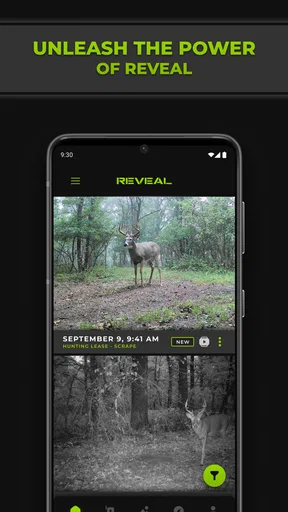
I use a cellular trail camera because the camera itself is only half the job. The other half is checking what it captured without repeatedly visiting the site. Tactacam REVEAL is built for that second part: it connects a compatible REVEAL cellular camera from Verizon or AT&T to a phone app, giving me a more practical way to review remote images and keep track of activity. It is a free photography app from Deer Management Systems, and I found its value depends less on creative editing and more on whether its camera-monitoring workflow fits the way you spend time outdoors.
That distinction matters. This is not a general photo gallery, a camera replacement, or a social photography tool. It is a companion for people who already use a compatible REVEAL camera and want the images and camera information brought to a mobile screen. In my experience, that focused purpose makes the app easier to judge: if you own the right hardware, it can reduce unnecessary trips; if you do not, installing it alone will not turn a phone into a remote wildlife camera.
How the app feels to use in real conditions
I find the app easiest to judge when I treat it as a quick field check, not a place to browse indefinitely: I open it with a specific question about the remote camera and decide whether the images justify a visit. That habit helps keep routine monitoring useful without letting every capture demand attention. Next, I look at what makes this focused workflow feel different from using an ordinary photo library.
Readability and navigation when the screen is busy
The most important accessibility question here is not whether the app offers an elaborate set of visual customization tools. It is whether I can understand the camera feed quickly, while standing outdoors, wearing gloves, dealing with glare, or checking several updates in a short break. The app’s strongest advantage is that its purpose is narrow. I am not moving through a large social network or an editing suite before reaching the images that matter. The experience is centered on the connected REVEAL camera and the photographs associated with it.
That focused arrangement is useful for people who prefer task-based navigation. A user who thinks in terms of “select camera, check images, decide whether to visit” has a clearer mental model than someone working through a broad photography platform. I also prefer this kind of separation from my regular phone gallery because remote-camera pictures can otherwise become mixed with personal photos, screenshots, and work images. Keeping the trail-camera workflow in its own place makes reviewing activity less distracting.
Readability still depends heavily on the phone and the environment. A small screen, bright sunlight, or a dim display can make wildlife images harder to inspect, especially when the subject is partly hidden in brush. I would not choose this app expecting it to solve every visual problem through the interface. The image itself may be the limiting factor: a dark nighttime capture, motion, distance, or camouflage can remain difficult to interpret no matter how cleanly the app presents it.
For someone with low vision, I would test the app on the actual phone that will be used in the field rather than relying only on a store preview. Larger system text and display settings may help with surrounding controls, but they cannot add detail that was never recorded by the camera. A tablet or a phone with a brighter, larger screen may be a better companion for careful identification than a compact handset. That is a practical trade-off, not a flaw unique to this app.
Worth Reading Before You Choose

EA SPORTS FC Mobile 26 Is a Bigger Football Game, but It Takes Time

Flipboard Shows What News Apps Must Do Beyond the Feed

Switching to Android Auto Means Rethinking Your Driving Routine

Google Calendar Makes a Crowded Week Easier to Manage

Ludo King Makes the Most of the Minutes Between Plans

Baby Panda World Brings Quick Play to Modern Phones, but Its Game Library Feels Busy
The rating is a useful sign that many owners find the experience worthwhile: it holds a 4.8 average from around 25 thousand ratings. I read that as strong evidence of satisfaction, but not as a guarantee that every camera setup or network situation will feel equally smooth. Cellular camera apps are unusually dependent on the hardware, signal, placement, and conditions at the remote site.
Motor effort and sensory load
From a motor perspective, the app’s main benefit is reducing travel rather than reducing every interaction on the phone. If a camera is mounted deep in woodland, checking recent captures remotely can save a long walk, a vehicle trip, or repeated climbing over difficult ground. That matters for users with limited stamina, chronic pain, balance concerns, or temporary injuries. It also helps anyone managing several cameras across a large property, because the app can make the first decision—“is a visit necessary?”—from a more comfortable location.
There is an important exception. Remote viewing does not remove the need to set up, maintain, and sometimes recover the physical camera. Mounting height, battery changes, aiming, weather protection, and cellular positioning still happen outside the app. I would recommend this setup to someone who wants fewer routine inspection trips, but not to someone expecting a completely hands-off system. The phone handles the monitoring side; it cannot replace physical access when the equipment needs attention.
The visual and emotional load can also be higher than it first appears. A user may receive many ordinary images, blank frames, partially triggered shots, or repeated views of the same area. Reviewing them can become tiring when the camera is placed near a busy trail or feeding location. The app is most comfortable when I approach it with a clear question: check whether an animal appeared, see whether the camera is still producing useful images, or decide whether conditions justify a visit. Browsing without a purpose can turn a simple monitoring task into a long, repetitive session.
For users who are sensitive to unexpected sounds or visual changes, I would keep phone behavior conservative and review alerts in a controlled setting. The app’s usefulness does not require constant attention. In fact, one of my better habits is to choose specific check-in times instead of reacting to every possible update. That reduces interruption and makes the information easier to act on.
The app is rated for Everyone, which makes it broadly approachable from an age-rating standpoint. That does not mean every outdoor workflow is suitable for every person. A child may be able to look through images, while an adult should still handle camera placement, property permissions, network decisions, and any field visit. The age label describes the app’s content, not the safety of the environment where the connected camera is installed.
Situational access: where the companion app earns its place
The clearest everyday scenario is a camera placed on a rural property that takes too long to reach for casual checks. I can imagine setting it near a game trail, leaving it in position, and using the app before deciding whether to drive out. If the images show nothing useful, the trip can wait. If they show a change worth investigating, the visit becomes intentional rather than routine. That is the kind of small decision the app improves.
It is also helpful for people who manage cameras across different terrain. A landowner may have one unit near an accessible entrance and another beyond a steep section. A wildlife observer may want to compare activity at separate locations without disturbing each site on the same schedule. Someone tracking seasonal movement can review images from home and keep a broader sense of what is happening, while still remembering that the camera’s position and cellular connection determine what the app can show.
Network context is central. The store summary specifically describes a REVEAL camera using Verizon or AT&T cellular connectivity, so I would confirm that the camera and intended location fit the relevant service arrangement before depending on remote access. A phone can have excellent reception while the camera site has poor coverage, and the opposite can also be true. The app is therefore not a substitute for checking the remote location’s practical connectivity.
This is where the app differs from ordinary photography alternatives. Google Photos, Apple Photos, and similar galleries are better for organizing pictures already stored on a phone, searching a personal library, or sharing everyday memories. They do not provide the same camera-companion purpose for a remote REVEAL unit. A generic trail-camera application may be a better choice if your hardware belongs to another brand, but switching apps will not solve a compatibility mismatch. The relevant comparison is not “which gallery looks nicer?” but “which companion supports the camera I actually installed?”
I also would not compare this directly with a manual camera visit as though they offer identical experiences. A physical visit gives me a chance to inspect the mount, clear vegetation, check the enclosure, and notice environmental problems. The app gives me convenience and a preview of activity. The best workflow uses remote review to reduce unnecessary visits, not to pretend that remote images replace maintenance.
Small workflow choices that make a difference
My first practical tip is to decide what information would trigger a visit before opening the app. For example, I might be checking for recent animal activity, a camera that has stopped producing useful images, or a change in a familiar pattern. This simple rule keeps the review focused and makes it easier to notice meaningful changes instead of getting lost in a long sequence of similar captures.
Second, I would verify the camera connection and service arrangement before mounting the unit in a difficult location. Testing from a convenient position is less frustrating than discovering after installation that the remote workflow is unreliable. This is especially important for users who cannot easily return to the site, because a setup problem becomes a physical-access problem as soon as the camera is out of reach.
Third, I would treat image quality as a placement issue as much as an app issue. A camera aimed directly into glare, dense vegetation, or a high-traffic path may produce images that are technically delivered but practically unhelpful. Reviewing the first batch in the app can reveal whether the framing answers the question I care about. If every capture shows too much empty space or the subject is consistently cut off, changing the camera position may help more than changing phone settings.
A fourth useful habit is separating urgent information from interesting information. Not every new image deserves an immediate response. A person with limited energy may benefit from a scheduled review, while a busy landowner may prefer to check only when planning a property visit. The app supports the idea of remote observation, but it still takes personal discipline to prevent the stream of images from becoming another source of interruption.
Finally, I would use a larger or brighter display when the purpose is careful image inspection. This is particularly relevant for older users, people with low vision, or anyone reviewing nighttime captures. A comfortable viewing setup can make the same app feel far more usable, while a small, reflective screen can make every image seem worse than it is.
Remaining barriers and situations where I would skip it
The biggest barrier is hardware dependence. Tactacam REVEAL is not a standalone photography utility that becomes useful for everyone after installation. Its role is tied to a compatible REVEAL cellular camera, and the store summary identifies Verizon or AT&T connectivity as part of that relationship. If I only want to edit phone photos, organize family albums, or take pictures while traveling, this is the wrong download.
Another barrier is the gap between remote information and physical reality. An image can show that something happened, but it may not tell me why the camera missed other activity, whether the unit shifted, or whether a battery and enclosure need attention. Users who need dependable equipment maintenance records or broader sensor management may want a more specialized system, provided it supports their camera and priorities. I would not buy into this workflow solely because remote images sound convenient; I would first accept the ongoing responsibility of maintaining the hardware.
Signal and environment create additional uncertainty. A remote camera may be surrounded by trees, positioned in a hollow, exposed to weather, or placed far from an easy access route. The app cannot make a weak connection behave like a strong one, and it cannot recover detail from poor framing. This is why I see the app as part of a system rather than an independent answer. Its success depends on the camera, network, placement, phone, and the user’s review habits working together.
There is also a privacy and responsibility angle that deserves ordinary common sense. A camera on private land should be placed with awareness of other people who might pass through the area, and images should be handled thoughtfully. The app makes remote viewing easier, which is convenient, but convenience should not replace consent, local rules, or careful decisions about who can access the camera’s images. I would establish those boundaries before sharing access with anyone else.
Users with motor limitations may appreciate avoiding unnecessary travel, but they should not underestimate the physical demands of installation and maintenance. Users with sensory sensitivities may prefer controlled review times rather than frequent checking. Users with visual impairments may need a larger screen or assistance interpreting low-quality images. These are not reasons to reject the app automatically; they are reasons to plan the complete workflow instead of judging accessibility from the phone interface alone.
Version, cost, and long-term practicality
The app is free, which lowers the cost of trying the phone side of the REVEAL setup. That is helpful for someone who already owns a compatible camera and wants to see whether remote monitoring fits daily routines. It should not be confused with the total cost of operating a cellular camera system, since the camera, connectivity arrangement, placement, and upkeep remain part of the larger decision.
It was released on May 28, 2020, and the current version is 5.10.4. The listed minimum operating system is Android 7.0, so owners of older devices should check compatibility before planning around it. I would also keep the phone’s operating system and the app current where possible, especially when the app is responsible for connecting a remote device. Updating is not a guarantee of perfect behavior, but using an outdated phone environment can make troubleshooting harder.
The adoption figures suggest that this is not an obscure experiment: it has passed 500 thousand installs and carries around 2.3 thousand written reviews. Those numbers help reassure me that the product has an established user base, while the individual experience can still vary with camera model, carrier conditions, and location. Popularity is useful context, not a replacement for checking whether the specific setup makes sense.
My inclusive verdict
I recommend Tactacam REVEAL to people who own or plan to use a compatible REVEAL cellular camera and want to make remote image checking part of a less demanding outdoor routine. Its best contribution is practical: I can decide whether a visit is worthwhile before spending the time and energy to reach the camera. That can be meaningful for landowners, wildlife observers, and users who need to limit unnecessary travel.
I would be more cautious for anyone expecting a universal photography app, a full accessibility solution, or a maintenance-free monitoring system. The interface’s focused purpose helps readability and navigation, but image visibility still depends on the phone and the quality of the capture. Remote access can reduce physical effort, but it cannot remove installation work, network limitations, or the need to inspect equipment in person.
My final judgment is positive because the app understands its job and stays close to it. Its real strength is turning a remote camera check into a decision I can make from a more accessible place. I would install it when the hardware, carrier context, and property workflow are already right; I would skip it when I simply need a normal photo organizer. For the right user, that distinction makes the free app genuinely useful rather than merely another photography download.
Pros
- Remote access to photos and videos from compatible REVEAL cameras.
- Useful cellular coverage options for monitoring remote locations.
- Motion alerts help you react quickly to activity in the camera area.
- Cloud storage makes captured media easier to review and organize.
- Simple controls make camera settings manageable from a mobile device.
Cons
- Requires a compatible Tactacam REVEAL camera and an active data plan.
- Cellular performance depends heavily on signal strength at the camera site.
- Some features and storage options may require a paid subscription.
- Battery life can vary significantly with signal
- weather
- and activity levels.
- Media loading may be slow when the camera has a weak network connection.
FAQs for Tactacam REVEAL
What is Tactacam REVEAL, and what is it used for?
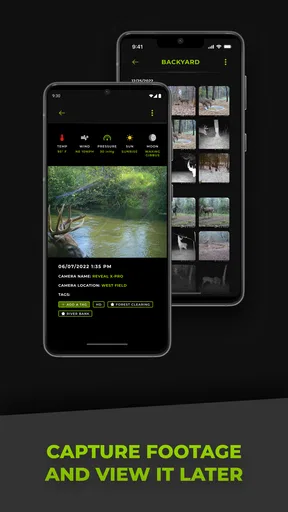
Tactacam REVEAL is a companion app for compatible REVEAL cellular trail cameras. It lets you manage connected cameras, view and organize captured photos and videos, check camera status, adjust selected settings, and receive alerts remotely. The app is mainly designed for wildlife monitoring, property observation, and scouting locations where physically visiting the camera regularly would be inconvenient.
Does Tactacam REVEAL require a compatible camera and cellular service?
Yes. The app is not a standalone camera application and requires a supported Tactacam REVEAL cellular camera to provide its main features. The camera also needs an active service plan and sufficient cellular coverage to transmit images or videos. Before downloading, users should confirm that their specific camera model is supported, the desired location has reliable network coverage, and the selected subscription meets their upload and monitoring needs.
Can I view photos and videos remotely with the REVEAL app?
You can generally view media transmitted by a connected REVEAL camera through the app without visiting the camera site. Depending on the camera model, service plan, network conditions, and configured settings, images may arrive at different resolutions or speeds, while video availability and delivery options can vary. Poor signal, low battery, limited storage, or an inactive plan may delay or prevent uploads.
What features can I manage from Tactacam REVEAL?
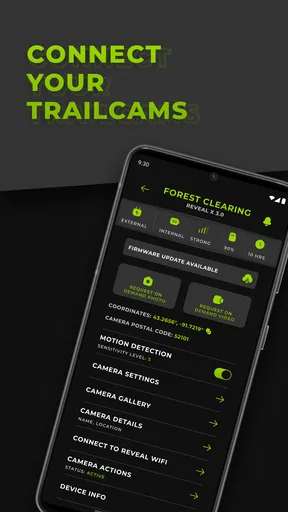
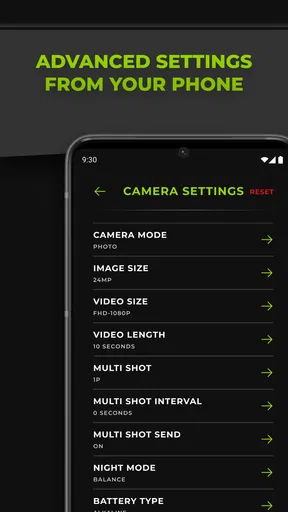
The available controls depend on the REVEAL camera model and subscription, but the app is intended to provide remote management tools such as checking battery and signal information, reviewing recent activity, changing selected capture or transmission settings, organizing cameras, and receiving notifications. Some advanced functions may not be available on every device, so users should compare the app’s capabilities with their camera’s documentation.
Is Tactacam REVEAL free to download and use?
The application may be free to download, but using it with a cellular REVEAL camera generally involves additional costs. Users typically need an activated camera service plan for cellular transmission, and plan pricing or limits can vary by region, camera model, image frequency, and media type. Internet access is also required on the phone, and mobile data charges may apply when using the app away from Wi-Fi.


